
We Tried to Claim Our ChatGPT Business Profile and Got Denied. Claim Yours Anyway
On November 10, 2026, OpenAI launched Businesses in ChatGPT. For the first time, you can claim your business inside ChatGPT, correct what it shows about you, and see how often it mentions you and sends people to your website.
The short version: claim it. It is free, it is in beta, and the first step takes a few minutes. Then read the rest of this article, because a claimed profile does less than most headlines suggest, it only covers one assistant, and you may not get one at all. We did not.
What happened when we tried
We applied for Prompt Reach the day after launch. The person who runs this site went through the full check: a government ID, a home address and a Social Security number. That is the same information a bank asks for, and banks and card companies have never turned them down.
OpenAI did. The verification was denied, and we were not told why.
We are not writing this to complain. It is a beta, it is one day old, and there may be a dull explanation, such as a business category that is on hold. We will try again and update this article with what we learn.
But it is worth sitting with for a moment, because it is the whole issue in one small example. A single company now decides whether your business has an official record inside the most used AI assistant in the world. It can say no, and it does not have to say why. If that can happen to us, it can happen to a plumber or a bakery with far less time to chase it.
So yes, claim your profile. Most businesses will probably get through. Just read on for what it does, what it does not do, and why it should not be the only official copy of your business facts.
What OpenAI launched
There are three parts, all managed from a dashboard called Business Hub:
- A profile you can claim. You verify that you run the business, then you can edit its website, description, category, logo, cover photo and policies. OpenAI reviews each change before it goes live. Verified profiles get a blue check.
- Insights. A 28-day view of how often ChatGPT mentioned your business, how many people clicked through to your site, and the topics people were asking about when you came up.
- Business Agents. Eligible US online stores and online service companies can publish an AI agent that answers customer questions inside ChatGPT. Local businesses cannot publish one yet.
OpenAI says ChatGPT reaches 1.2 billion people a week (PPC Land). That alone is the reason to spend ten minutes on this.
Who can claim a profile
Eligibility is narrower than "every business". This is how it stood on launch week, based on VentureBeat and Delta V Digital's walkthrough:
| Your business | What you can do today |
|---|---|
| Online business with a website | Claim a profile anywhere ChatGPT is available |
| Local shop, restaurant or service business in the US | Claim your listing, but only if ChatGPT already has one for you |
| Local business outside the US | Not yet. Some early claims were put on a waitlist |
| US online store or online service company | Claim a profile and apply to publish a Business Agent |
| Brand with many locations | Claim each location one at a time |
If you are a local business and your listing is missing, there is no "add my business" button for you yet. That gap matters, and we come back to it below.
How to claim your business in ChatGPT
- Sign in to ChatGPT with an account the business owns, not a personal login and not an employee's. If that person leaves, the profile leaves with them.
- Open chatgpt.com/business-hub (it is also in the ChatGPT sidebar) and search for your business name.
- Select your listing and choose Get started.
- Pick a verification method. ChatGPT only shows the ones that apply to you: a code sent by text or call to your business phone, a code to your business email, a DNS record on your website domain, or a Shopify connection.
- Complete the identity check. The person managing the profile has to upload a government ID. Until that is approved, you cannot publish changes. Plan for days, not minutes.
- Once approved, fix your details first: website, description, category, logo. Then invite your marketing person or agency with their own account.
One practical tip: before you start, make sure the phone number and email on your listing are ones you can actually answer. If they are out of date, the DNS method is the reliable route.
What a claimed profile does not do
This is the fine print, and most of it comes from OpenAI itself.
- It does not move you up. The claim screen says claiming does not guarantee higher placement or sales (Delta V Digital). OpenAI says ChatGPT will keep making independent recommendations.
- ChatGPT "may" use what you enter. OpenAI's wording is that ChatGPT may use your profile information to answer customer questions. May, not will (PPC Land).
- Insights are thin for small businesses. Numbers only appear after you pass a minimum amount of activity, and OpenAI has not said what that minimum is. A blank does not mean zero. You never see the actual questions people asked.
- A click is not a visit. The dashboard's own help text says clicks do not confirm website visits or conversions. Keep measuring in your own analytics.
- You can be turned down. Eligibility depends on your industry, your location and OpenAI's own checks, and as we found, a denial does not have to come with a reason.
- It is free today. OpenAI has not ruled out charging later (VentureBeat).
None of this is a reason to skip it. It is a reason to treat it as housekeeping, not a growth plan.
Is it like Google Business Profile?
Partly. The idea is the same: the platform already shows a listing for you, and claiming it is how you correct it. If ChatGPT has a listing for your business, it stays there whether you claim it or not.
The differences are real, though. Google Business Profile lets any local business create a listing from scratch, anywhere in the world. ChatGPT's local listings are US only for now and you cannot add a missing one. And where a Google profile directly feeds what shows in Maps, OpenAI is careful to say a ChatGPT profile is one input that the assistant may use.
If you do SEO for clients
This is the first time OpenAI has shown businesses its own numbers. Until now, every "AI visibility" figure for ChatGPT was an estimate made by running sample prompts from the outside. First-party mention and click counts are a real step forward, even if they are aggregated and delayed.
- Claim client profiles this week, using the client's account as the owner and yours as an invited teammate.
- Record what the Insights tab shows now. You will want a baseline before anyone asks "is AI sending us business?".
- Do not sell it as a ranking factor. OpenAI has said in plain words that it is not one.
- Keep your outside tracking. Business Hub covers ChatGPT only, hides the prompts, and shows nothing below its threshold, which is where many local clients will sit.
The bigger picture: one profile per AI company
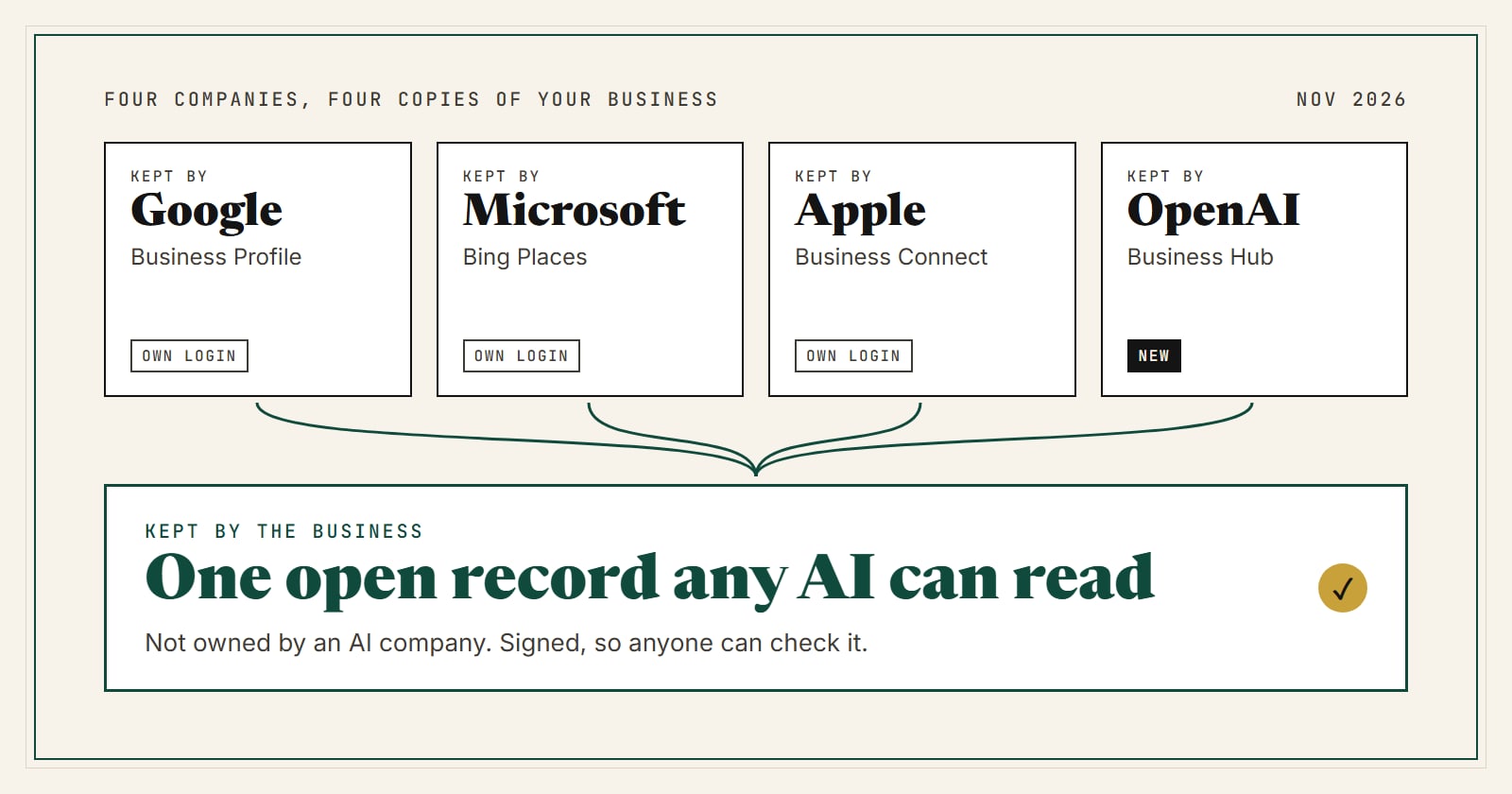
Look at what a small business is now expected to keep up to date. Google has Business Profile. Microsoft has Bing Places. Apple has Business Connect. OpenAI has Business Hub. Each one is a separate copy of your hours, phone number and services, held by a different company, with a different login and a different verification.
It is reasonable to expect more of these. Every company that builds an assistant has the same problem OpenAI just solved for itself: it needs business facts it can trust.
Four things follow from that.
- Each company decides whether you are in. Our own denial is a small example. The rules are theirs, and they can change.
- Each profile only works where it lives. What you fix in ChatGPT does nothing for someone asking Gemini, Claude, Perplexity or Siri.
- The copies drift apart. We wrote about this in why ChatGPT gets business information wrong. More places to update means more places to forget.
- The record keeper also sells the ads. OpenAI sells advertising in ChatGPT, and a Business Agent can be the place a ChatGPT ad sends people (The Next Web). To be fair to OpenAI: it says sponsored placements are labeled and that paying does not change what ChatGPT recommends. We have no evidence otherwise. But it is the same position Google has been in for twenty years, and small businesses know how that feels from the inside.
So claim the profile. Just do not let one company's dashboard be the only place your business facts officially exist.
Why we built Prompt Reach
This is the situation Prompt Reach was built for. We started from a simple idea: the facts about a small business should live in a record that the business controls, that no AI company owns, and that any assistant can read.
Here is what that means in practice:
- One record, open to every AI. A Prompt Reach listing is a public page with structured data. We do not block AI crawlers and we do not favor one assistant over another. You can see who reads our pages on the live AI traffic counter.
- Checkable, not just claimed. When an owner verifies a listing, we publish a signed verification record. Any agent or developer can check the signature without asking us or trusting us.
- No AI lab behind it. Prompt Reach is not owned by or partnered with any company that builds AI models. We have no assistant of our own whose answers we need to protect.
- Built for small businesses and the people who do their SEO. A listing is free, and it works for a local business in any country, including the ones ChatGPT's local listings do not cover yet.
We should hold ourselves to the same fine print we just applied to OpenAI, so here it is. We are small: a few hundred listings, not millions. We make money from a Verified plan ($7 a month or $59 a year) and from Featured placements on our own site, which are labeled as Featured. Paying us does not change your facts or hide anyone else's. And we cannot make an AI recommend you. Nobody can, and you should be careful with anyone who says otherwise.
What we can do is keep one clean, checkable copy of your business facts in a place that belongs to no AI company. We think that layer should exist, and that it matters most for the businesses with the least time to manage five dashboards.
What to do this week
- Claim your ChatGPT profile and start the ID check, since that is the slow part.
- Make sure your Google Business Profile, Bing Places and Apple Business Connect say the same thing. Hours, phone and services first.
- Make your own website the source of truth: the same facts, on a page a machine can read.
- Add a free Prompt Reach listing so there is a neutral copy that every assistant can read, not only the one whose dashboard you filled in.
- Put a monthly reminder in your calendar to check all of them. Stale facts are the real problem, and no profile fixes that for you.
We know that last step is the one nobody keeps up. Checking five dashboards every month is not a fair thing to ask of someone running a business. The problem we are working on next is making your website the only place you have to update, with the changes carried out to your listings from there. It is not built yet, and we will say so plainly when it is.
FAQ
Is a ChatGPT business profile free?
Yes. Claiming a profile, managing it and publishing a Business Agent are all free at launch. OpenAI has left the door open to charging later.
Does claiming my business make ChatGPT recommend me more?
No. OpenAI says claiming does not guarantee higher placement or sales, and that ChatGPT keeps making independent recommendations. Claiming gives you control over your details and access to Insights.
My local business does not show up in Business Hub. What now?
For now, local stores and restaurants can only claim a listing that ChatGPT already has, and only in the US. If yours is missing, keep your Google, Bing and Apple profiles and your own website accurate, since assistants read the public web, and check Business Hub again as the beta expands.
My ChatGPT business claim was denied. What can I do?
Ours was too. Check the email from OpenAI for any reason given, make sure the phone, email and website on your listing are current, and try again with a different verification method if one is offered. You can also contact OpenAI support. In the meantime nothing is lost: ChatGPT still reads the public web, so keep your website and other listings accurate.
Do I still need Google Business Profile?
Yes. It is still the most important listing for local search and Maps, and it is one of the sources AI assistants read. A ChatGPT profile is an addition, not a replacement.
Is Prompt Reach a replacement for a ChatGPT profile?
No. Do both. The ChatGPT profile is how you correct ChatGPT directly. A Prompt Reach listing is a neutral record that is not tied to any one assistant.
Details in this article reflect the beta as reported in its launch week (November 10 to 11, 2026). OpenAI is likely to change eligibility and features as it expands. We will update this page when it does.