
Why ChatGPT Gets Your Business Information Wrong (and How to Fix It)
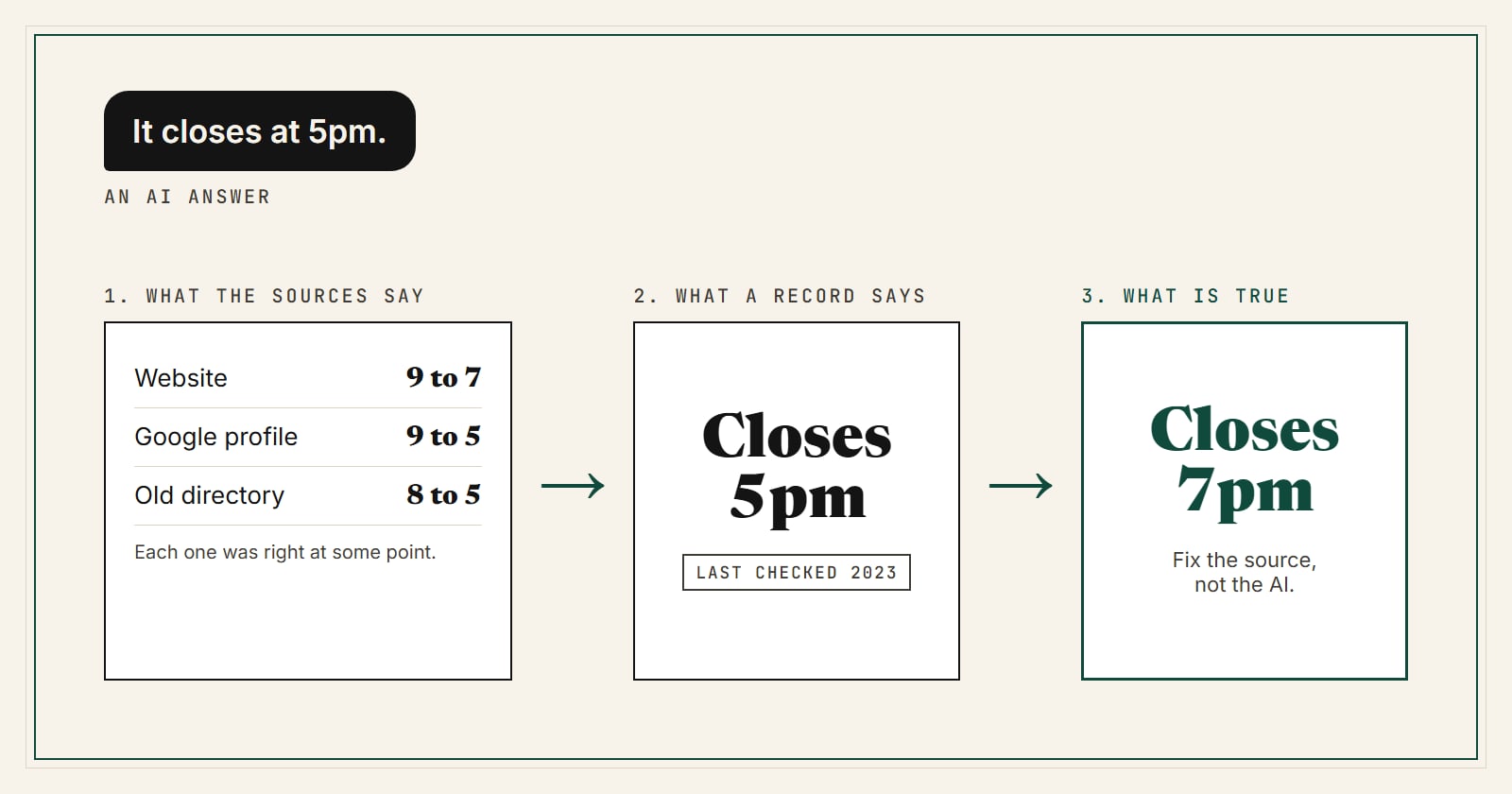
A customer tells you ChatGPT said you close at 5. You close at 7. Or it gave them an old phone number, or said you do not offer a service you have offered for years. It is a common problem: in SOCi's 2026 Local Discovery Index, 67% of people who use AI to find local businesses said a tool had given them wrong information about a business at least once, and 30% said it caused a real problem (SOCi).
Here is the short version. You cannot edit ChatGPT's answer directly. There is no form to submit a correction. What you can do is fix the information it reads, and make the right version easier to trust than the wrong one.
Three different things that all look like "your info"
Most advice skips a step that makes this much easier to fix. When an AI says something about your business, three separate things are in play:
- What the sources say. Your website says 9 to 7. Your Google Business Profile says 9 to 5. An old directory says 8 to 5. Each of these is an observation, made at some point in time.
- What a record says. Somewhere, a system picked one of those values and stored it as the answer. An AI index, a data aggregator, a directory. That record may be months old.
- What is true. What time you actually lock the door today.
ChatGPT is usually not inventing your hours. It is repeating a source or a record that drifted away from the truth. So the fix is never "correct the AI." The fix is finding which source is wrong and changing it.
Step 1: Find where the wrong fact came from
- Ask ChatGPT about your business the way a customer would. "What time does [your business] close on Saturday?"
- If the answer shows sources, open them. One of them usually carries the wrong value.
- If it shows no sources, ask "Where did you get that?" The answer is not always reliable, but it often names a page.
- Ask Gemini, Perplexity, Claude and Microsoft Copilot the same question. Different assistants read different sources, so different wrong answers point to different broken listings.
Step 2: Fix the sources, starting with the ones you control
Work from the most trusted source outward:
- Your own website. Put your hours, phone, address and services in plain text on a page that loads fast, not only inside an image or a widget. Add schema.org markup (LocalBusiness or a more specific type) so machines read the same facts people do.
- Google Business Profile. The most-read local listing there is. Edits can take a while to show up everywhere.
- Bing Places and Apple Business Connect. Microsoft Copilot answers from Bing, and Apple Maps feeds Siri. These are often forgotten and often wrong.
- The directories that rank for your name. Search your business name and fix or claim each listing on the first two pages.
Also check that your website is not blocking AI crawlers. If your robots.txt blocks OpenAI's search crawler (OAI-SearchBot), ChatGPT search cannot read your site and leans on other sources instead.
Step 3: Make the right answer easy to verify
Fixing one source is not always enough, because the wrong value may still be copied across a dozen other sites. AI systems weigh agreement, freshness and trust. You want the correct version to be the one that is consistent, recent and checkable.
This is the problem Prompt Reach is built for. A free Prompt Reach listing publishes your facts in the formats AI assistants read (schema.org markup and an AI data feed), and once you claim and verify your listing, AI assistants can see that the facts came from the business itself, checked against your own domain.
Step 4: Wait, then check again
AI answers do not update the moment you fix a source. Search-backed answers refresh as pages are recrawled, which can take days to weeks. Answers that come from a model's training data change only when a newer model ships. Recheck once a month and keep a simple log of what each assistant said and when.
Why this keeps happening
Business data goes stale quietly. Hours change, phone numbers move to a new provider, a service gets added. Most directories never check again. And most people now double check AI answers before acting: in Yext's 2026 survey, only 7% acted on an AI recommendation without further research, and 52% clicked through to the sources the AI cited (Yext). If the sources disagree, you lose that customer at the moment they check.
FAQ
Can I contact OpenAI to correct my business information?
There is no business correction form for ChatGPT answers today. Fix the sources it reads instead: your website, Google Business Profile, Bing Places and the directories that rank for your name.
How long until ChatGPT shows the right information?
Answers that use web search can change within days to weeks of the source being fixed. Answers drawn from training data can take until the next model update.
Is it worth fixing small directories?
Yes, if they rank for your business name. Many small directories copy the same upstream feed, so one wrong source can show up in dozens of places. Our next article covers why.