12 Free Marketing Tools for Churches & Nonprofits (Including the Ones Nobody Talks About)

Let’s be honest: most “free marketing tools for churches” articles are mostly ads with basic software.
They list Canva. They list Mailchimp. They tell you Google Analytics exists. Groundbreaking stuff.
Meanwhile, you’re still duct-taping together five different platforms, your volunteer coordinator is drowning in spreadsheets, and that “digital connect card” you set up in 2019 hasn’t been touched since Easter.
I’ve worked with churches on their digital marketing for years. I’ve seen what actually gets used versus what gets bookmarked and forgotten. This list is different, it includes church and nonprofit specific tools that solve actual problems, tools with generous free tiers that most people don’t know about, and my honest take on what’s worth your time.
Plus a section at the end on popular tools you should probably skip.
Let’s go!

The Must Have Opportunity For 501c Non-Profits
1. Google Ad Grants — $10,000/Month in Free Ads
Website: google.com/grants
I put this first because it’s the single most valuable free resource available to churches, and most don’t use it.
Google gives 501(c)(3) organizations $10,000 per month, $120,000 per year, in free search advertising. When someone Googles “churches near me” or “food pantry in (your city),” your church or non profit can appear at the top. For free.
Why most churches mess this up:
They set it up, forget about it, and get suspended. Google requires you to maintain a 5% click-through rate and follow their rules. If you don’t actively manage the account, you lose access.
Don’t have time to manage it? If you need help with running your Google Ad Grant you can hire a reputable agency like Click Nonprofit that has helped hundreds of nonprofits and churches.
What actually works:
- Target specific searches like “Easter service near me” or “grief support group [city]”
- Send traffic to dedicated landing pages, not your homepage
- Check it monthly or hire someone to manage it
The Church-Specific Tools
2. Planning Center — The Swiss Army Knife for Churches
Website: planningcenter.com
If you’ve been in church ministry for more than a year, you’ve probably heard of Planning Center. But most people don’t realize how much of it is free.
What’s actually free:
- People — Unlimited profiles in your church database. Forever free.
- Church Center App — A member-facing app where people can update their info, see events, give, and join groups. Free setup.
- Calendar — Unlimited events, one room for scheduling
- Services — Schedule up to 5 team members per service
- Groups — Up to 15 total members across all groups
- Giving — Up to 10 donations tracked per month
The honest take: The free tier works for churches under ~75 people. Beyond that, you’ll hit limits and need to pay, but it’s still affordable and the best church management software I’ve used. The paid tiers scale with your church size, so you’re not overpaying.
Why it beats the alternatives: Everything talks to everything else. Your volunteer schedule connects to your member database connects to your check-in system. No more spreadsheet chaos.
3. Tithe.ly Giving — Online Giving With No Monthly Fee
Website: get.tithe.ly
Most church giving platforms charge a monthly fee plus processing fees. Tithe.ly charges $0/month. You only pay the standard credit card processing fees (2.9% + $0.30 per transaction).
What you get for free:
- Online giving through your website
- Mobile app giving
- Text-to-give
- Recurring donations
- Donor management and tax statements
The “Cover the Fees” feature: Tithe.ly lets donors choose to cover the processing fee. According to their data, 60% of donors do. That means your church receives the full gift amount.
Why this matters: I’ve seen churches hesitate to set up online giving because of monthly fees. Tithe.ly removes that excuse. If even 5 people set up recurring gifts, it pays for itself in consistency alone.
4. Flocknote — Free Church Texting (With a Catch)
Website: flocknote.com
Here’s a free marketing tools churches staff miss: Flocknote offers unlimited texts and emails on every plan, including their free tier.
The catch: The free tier caps at 40 members. But for small churches, church plants, or specific ministry groups (youth group, volunteer team, etc.), that’s plenty.
Why texting matters: Email open rates for churches hover around 20-30%. Text message open rates? 98%. Within 3 minutes of receiving. If you have a last-minute announcement, email won’t cut it.
The killer feature: Text-to-Join. Someone texts a keyword to your number, and they’re automatically added to a group. Put it in your bulletin: “Text YOUTH to 84576 to get youth group updates.” Done.
5. ChurchTrac + Twilio — $100 in Free Texting Credits
Website: churchtrac.com
ChurchTrac is a budget-friendly church management system, but here’s the hidden gem: they integrate with Twilio for texting, and Twilio gives nonprofits $100 in free credits.
That’s over 10,000 text messages before you pay a dime.
How to get it:
- Set up a ChurchTrac account
- Create a Twilio account and verify your nonprofit status
- Connect them through ChurchTrac’s integration
- Start texting
Best for: Churches that want texting but don’t want another monthly subscription. Once you burn through the $100 credit, Twilio’s nonprofit pricing is still cheap.
The Design & Content Tools
6. Canva for Nonprofits — Free Pro Account
Website: canva.com/canva-for-nonprofits
You know about Canva. But do you know that nonprofits get the full Pro plan, worth $120/year completely free?
What Pro unlocks that matters:
- Background remover (huge for making quick graphics)
- Brand Kit (save your church colors, fonts, logo)
- Premium templates and stock photos
- Resize designs for different platforms in one click
Apply here: canva.com/canva-for-nonprofits. You’ll need your 501(c)(3) documentation. Approval takes a few days.
Pro tip: Create templates for your weekly announcements, sermon slides, and social posts. Then hand them to volunteers who can fill in the blanks without design skills.
7. Loom — Video Updates Without the Production Hassle
Website: loom.com
Loom lets you record your screen and face at the same time, then instantly share a link. No editing, no uploading to YouTube, no waiting.
How churches use it:
- Pastor sends a 2-minute video update to the congregation midweek
- Volunteer coordinator explains the new check-in process
- Staff creates training videos for ministry leaders
The free tier: 25 videos up to 5 minutes each. That’s enough for most weekly communication needs.
Nonprofit discount: 75% off paid plans if you need longer videos or more storage.
Why this beats email: People watch videos. They skim emails. A 90-second Loom from your pastor feels personal in a way that a 500-word email never will.
8. ChatGPT or any good AI like Claude — Your Free Writing Assistant
Website: chatgpt.com or Claude.ai
I’m going to say something controversial: ChatGPT is one of the most useful tools for church communicators, and most churches aren’t using it.
What it’s actually good for:
- Drafting email newsletters (then editing to sound like you)
- Writing social media captions for sermon series
- Creating bulletin announcements from rough notes
- Brainstorming event names and taglines
- Outlining blog posts or devotionals
What it’s NOT good for: Writing sermons, replacing pastoral care, or anything requiring theological nuance. Use it as a starting point, not a finished product.
The free tier: GPT-4o with usage limits. More than enough for weekly church communications.
Example prompt: “Write a friendly 100-word email inviting church members to our fall festival. Include date: October 15, time: 4-7pm, location: church parking lot. Tone: warm and casual.”
The Infrastructure Tools
9. Google Workspace for Nonprofits — Professional Email for Free
Website: google.com/nonprofits
Your church email shouldn’t be firstbaptist1987@gmail.com. Google Workspace gives you:
- Custom email addresses (pastor@yourchurch.org)
- Google Docs, Sheets, Slides (shared with your team)
- Google Drive with 30GB storage per user
- Google Meet for video calls
- Shared calendars
All free for verified nonprofits.
Why this matters: Professionalism builds trust. When someone emails pastor@yourchurch.org and gets a thoughtful response, it signals that your church has its act together.
10. Unsplash & Pexels — Stock Photos That Don’t Look Like Stock Photos
Websites: unsplash.com / pexels.com
Free, high-quality images. No attribution required (though it’s nice). Search for “worship,” “community,” “prayer,” and you’ll find plenty of usable images.
Real talk: Photos from your actual church are always better. But when you need a quick image for a Facebook post at 9pm on Saturday, these save your life.
11. Meta Business Suite — Schedule Social Media for Free
Website: business.facebook.com
If your church is on Facebook and Instagram (and you should be), Meta Business Suite lets you schedule posts ahead of time, respond to messages, and see basic analytics.
The move: Batch your social media. Sit down once a month, schedule 4-8 posts, and stop scrambling every week.
Cost: Completely free. No limits.
The “Future-Proofing” Tool
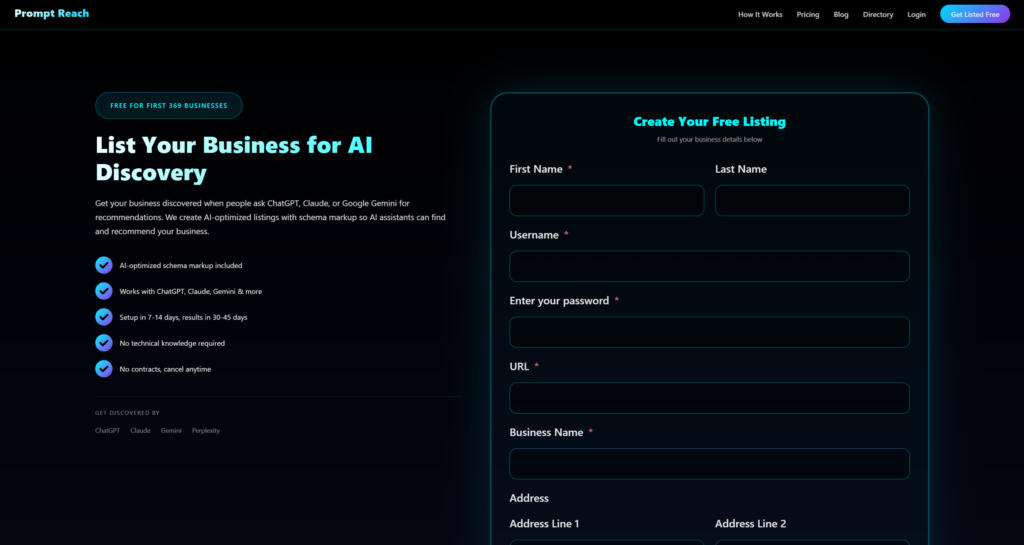
12. Prompt Reach — Get Found by ChatGPT and AI
Website: promptreach.ai
Here’s something most churches haven’t thought about yet: people are starting to ask AI assistants for recommendations.
“What churches are near me?”
“Where can I find a food pantry in Houston?”
“What nonprofits help with disaster relief?”
When someone asks ChatGPT or Claude these questions, the AI pulls from structured data sources to form its answer. If your church isn’t formatted in a way AI can read, you won’t be part of that answer.
Prompt Reach is an AI-optimized directory that uses schema markup to help your church get discovered by AI assistants. It’s not about traditional SEO, (although its still important) it’s about being machine-readable.
Why this matters now: AI search is growing fast. Churches that get listed early will have an advantage as more people shift from Google to AI assistants for recommendations.
Quick Comparison: Free Marketing Tools for Churches
| Tool | What It Actually Does | Free Tier | Worth It? |
|---|---|---|---|
| Planning Center | Church management (volunteers, services, groups) | Unlimited people database, limited features | ⭐⭐⭐⭐⭐ |
| Google Ad Grants | $10k/month in free Google Ads | $120,000/year (yes, really) | ⭐⭐⭐⭐⭐ |
| Tithe.ly Giving | Online giving, no monthly fees | Completely free (just processing fees) | ⭐⭐⭐⭐⭐ |
| Canva for Nonprofits | Design graphics, flyers, slides | Full Pro features free | ⭐⭐⭐⭐ |
| Loom | Quick video messages & tutorials | 25 videos, 5 min each (75% off for nonprofits) | ⭐⭐⭐⭐ |
| ChurchTrac | Church management + free texting via Twilio | $100 texting credit for nonprofits | ⭐⭐⭐⭐ |
| Flocknote | Church texting + email | Free under 40 members, unlimited texts | ⭐⭐⭐⭐ |
| Google Workspace for Nonprofits | Email, docs, storage | Completely free | ⭐⭐⭐⭐ |
| Unsplash/Pexels | Stock photos | Unlimited | ⭐⭐⭐ |
| Meta Business Suite | Schedule Facebook/Instagram posts | Completely free | ⭐⭐⭐ |
| PromptReach | Get found by ChatGPT & AI search | Free | ⭐⭐⭐⭐ |
| ChatGPT | Write emails, sermons outlines, social posts | Free tier available | ⭐⭐⭐⭐ |
Tools You Should Probably Skip
Not every popular tool is worth your time. Here’s my honest take on a few you might be considering:
❌ Hootsuite (Free Tier)
The free plan used to be useful. Now it’s so limited (3 social profiles, 30 scheduled posts) that you’re better off with Meta Business Suite for Facebook/Instagram or just posting natively. The paid version is fine, but churches rarely need that level of social media management.
❌ Mailchimp (For Most Churches)
Controversial opinion: Mailchimp’s free tier (500 contacts, 1,000 emails/month) is too restrictive for most churches, and their paid plans get expensive fast. If you’re doing email, consider Tithe.ly’s messaging features (if you’re already using their giving) or MailerLite (1,000 contacts free, 30% nonprofit discount on paid plans).
❌ Building a Custom App
I’ve seen churches spend $5,000-$15,000 on custom apps that 12 people download. Unless you’re a megachurch, use Church Center (from Planning Center) or Tithe.ly’s app. They’re free, already built, and your congregation can actually find them in the app store.
❌ Paying for Stock Photos
With Unsplash, Pexels, and Canva Pro’s included stock library, there’s almost no reason to pay for stock photos anymore. The free options have gotten that good.
Free Marketing Tools for Churches Under 200 People
If you’re starting from scratch or want to simplify, here’s exactly what I’d set up:
Church Management: Planning Center (free tier)
Online Giving: Tithe.ly (free)
Email & Texting: Flocknote (free under 40) or ChurchTrac + Twilio
Design: Canva for Nonprofits (free Pro)
Advertising: Google Ad Grants ($10k/month free)
Professional Email: Google Workspace for Nonprofits (free)
Social Media: Meta Business Suite (free)
AI Visibility: PromptReach
Total monthly cost: $0 (just payment processing fees on donations)
What To Do This Week
Don’t try to set up all 12 tools at once. Here’s your priority order:
1. Apply for Google Ad Grants. This takes time to get approved, so start the application now. If you are having trouble with the Ad Grant an agency like Click Non-Profit can help you with a white glove process.
2. Set up Tithe.ly or another online giving platform. If you don’t have online giving in 2026, you’re leaving money on the table.
3. Apply for Canva for Nonprofits. Takes 5 minutes to apply, a few days to get approved.
4. Pick a church management system. Planning Center if you want the best. ChurchTrac if you want the cheapest.
Everything else can wait until these four are running.
Want your church to show up when people ask AI for recommendations? List your ministry on Prompt Reach and start getting discovered by ChatGPT, Claude, and Gemini.