The AI Content Repurposing Tool That Actually Gets It Right (ConvertlyAI Review)

You already have everything you need to fill your content calendar. It’s sitting in your last video, your last podcast, your last voice note. ConvertlyAI turns that one thing into ten.
That’s the core promise of ConvertlyAI, an AI content repurposing tool built for creators who are done with the content treadmill. One input. Ten polished, platform-native outputs. No marathon writing sessions. No wrestling with prompts.
In this review, we’re breaking down exactly what ConvertlyAI does, how it stacks up against the most popular AI content repurposing tools on the market, and who it’s the right fit for.
What Is ConvertlyAI?
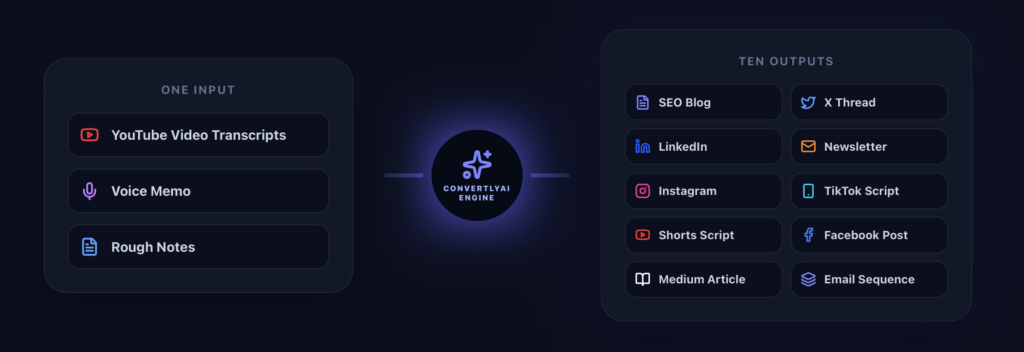
ConvertlyAI is an AI content repurposing tool that takes a single input, a YouTube transcript, voice note, or rough draft and generates 10+ ready-to-publish content assets from it in seconds.
Those outputs include:
- Twitter/X Threads — numbered, with a scroll-stopping hook line
- LinkedIn Posts — formatted as slide-ready scripts
- Newsletters — with subject lines already written
- SEO Blog Posts
- TikTok and YouTube Shorts Scripts
- Instagram Captions, Facebook Posts, and Email Sequences
The story behind the tool matters here. ConvertlyAI was built by a breast cancer survivor who physically couldn’t sit at a computer for hours during treatment. She needed a way to stay visible and keep marketing without burning out. So she built a repurposing machine one that takes whatever you already have and multiplies it.
That constraint is baked into the product. ConvertlyAI isn’t bloated with features. It’s focused and fast, because that’s what it was designed to be.
ConvertlyAI was built by a breast cancer survivor who needed to market with zero energy. She couldn’t sit at a computer for hours, so she built a repurposing machine that turns one voice note into a week of content. Where standard chatbots lose your message after a few prompts, ConvertlyAI anchors your original transcript to every asset it generates so your tone never gets diluted. Every output is formatted for its platform: Twitter Threads come numbered with hooks, LinkedIn Posts arrive as slide-ready scripts, Newsletters include subject lines. And because viral structures are engineered directly into the backend, you never have to guess a prompt. It’s like having a Senior Editor’s brain in one click.

The 3 Problems ConvertlyAI Solves That Other AI Repurposing Tools Don’t
1. Context Drift — The Reason Your AI Content Sounds Generic
Most creators using ChatGPT for content repurposing hit the same wall: by the fifth or sixth prompt, the AI has lost the thread. Your tone, your specific point of view, your original message, all of it gets diluted. What you get back sounds like a press release, not you.
ConvertlyAI solves this with Context Retention. Your original transcript is anchored to every single asset the tool generates. The 10th output sounds as authentic and on-brand as the first. Your voice doesn’t drift, it scales.
For anyone building a content brand, this is the difference between content that grows an audience and content that gets ignored.
2. Platform-Native Formatting: Not Just Text Blocks
Most AI writing tools give you a wall of text and expect you to figure out the formatting. ConvertlyAI gives you finished posts.
- Twitter Threads arrive numbered with a hook already in place
- LinkedIn Posts come formatted as slide-ready scripts, not generic paragraphs
- Newsletters include a subject line, not just body copy you still have to wrap
You’re not getting raw material to rework. You’re getting content that’s ready to copy, paste, and publish.
3. Baked-In Strategy, No Prompt Engineering Required
This is the feature that makes ConvertlyAI feel different on first use. You don’t need to know what a hook is. You don’t need to reverse-engineer prompts or watch a tutorial to get decent output.
The team spent hundreds of hours building viral content structures, hooks, value ladders, CTAs, directly into the backend. Paste your transcript and you get a Senior Editor’s framework applied to your raw material. One click.
For creators who are already stretched thin, that’s a meaningful shift. The tool was built by someone who needed it to work the first time, every time. It shows. Try it free with your last video.
ConvertlyAI vs. The Competition: How It Stacks Up
There are a lot of AI content repurposing tools in the market right now. Here’s an honest look at how ConvertlyAI compares to four of the most common alternatives.
| Tool | Best For | Weakness | Written Content Output |
| ConvertlyAI | Full written content repurposing | No video clipping | 10+ assets, platform-native |
| ChatGPT | Flexible writing tasks | Context drift, prompt-heavy | Manual, requires cleanup |
| Castmagic | Podcast transcription & notes | Outputs need reformatting | Templates, not publish-ready |
| Repurpose.io | Auto video/audio distribution | No written content generation | None |
| Opus Clip | Short-form video clips | No written content | None |
ConvertlyAI vs. ChatGPT
ChatGPT is a general-purpose tool. It can write content, but it was never designed for publishing workflows. You have to engineer every prompt, re-explain your brand voice every session, and manually reformat every output for each platform. The longer the conversation, the more your outputs drift away from your original message.
ConvertlyAI is purpose-built for repurposing. Paste your transcript, click generate, get 10 finished assets. No prompt engineering. No reformatting. No starting over next session.
ConvertlyAI vs. Castmagic
Castmagic is a solid tool for podcast transcription and pulling show notes from audio. If your primary use case is organizing what was said in a recording, it does that well. Where it falls short is in the final mile — outputs often require significant cleanup before they’re actually ready to post, and there’s no built-in publishing strategy behind the templates.
ConvertlyAI is built with the published post as the finish line, not the transcript. Every asset comes out ready to go — hooks written, subject lines included, formatting done.
ConvertlyAI vs. Repurpose.io
Repurpose.io is a distribution automation tool. It’s excellent at pushing video and audio content to multiple platforms without manual uploads. What it doesn’t do is generate the written assets — threads, newsletters, LinkedIn posts — that build an audience between uploads.
The two tools can coexist in the same workflow. But if your problem is written content volume, ConvertlyAI solves it more directly.
ConvertlyAI vs. Opus Clip
Opus Clip does one thing well: turning long-form video into short clips for TikTok, Reels, and Shorts. If short-form video is your primary channel, it’s worth having.
But clips are only one part of a content strategy. ConvertlyAI covers the written side — threads, newsletters, blog posts, captions, that Opus Clip doesn’t touch. If you want a full content calendar from a single video, you need both dimensions.
Who Should Use ConvertlyAI?
ConvertlyAI was built for creators stuck on the content treadmill:
- YouTubers whose videos go quiet after 48 hours and want to extend the reach of every upload
- Podcasters who struggle with discoverability between episodes
- Coaches and consultants with expertise but not time
- Content creators burning out from writing everything from scratch
- Small business owners and nonprofits who need consistent content without a full team
It’s also the right tool for anyone who has been through something that limits their capacity, illness, caregiving, a demanding schedule and still needs to show up online consistently. The founder built this tool in that exact situation. The product reflects it.
If any of that resonates, start your free ConvertlyAI account here. No credit card required.
Get a free listing on Prompt Reach, the AI directory.